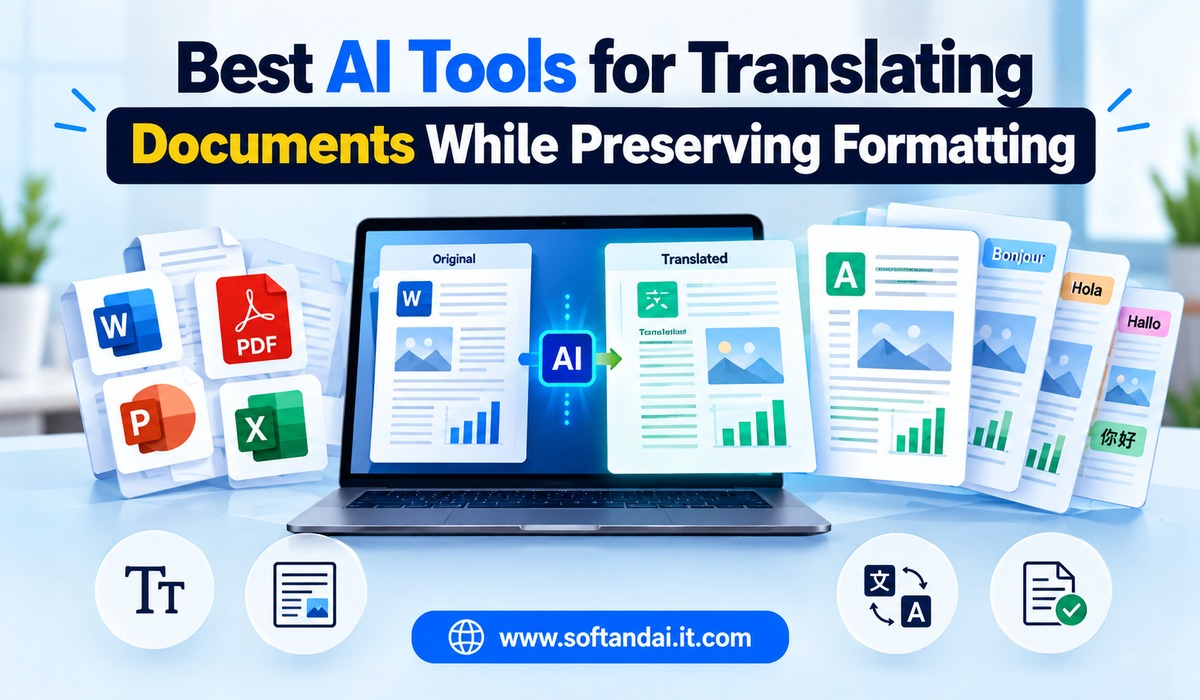
Translating a document into another language is easier than ever because of artificial intelligence. People no longer need to translate every sentence manually or spend hours copying text into different translation websites. Modern AI tools can translate complete documents while keeping much of their original appearance, including headings, paragraphs, tables, images, and page layouts.
However, translating a document is not just about changing words from one language to another. The document should also remain easy to read and look professional after translation. For example, a business report translated from English to Hindi should maintain its headings, tables, spacing, and overall structure. Similarly, a PDF translated into Spanish should remain organised rather than turning into a collection of poorly arranged paragraphs.
This is why choosing the right AI translation tool matters. Some tools are better for Word documents, while others work well with PDFs, presentations, and business files. Some focus on translation quality, while others provide better support for maintaining the original design.
In this article, we will explore the best AI tools for translating documents while preserving formatting, their features, benefits, limitations, and how to choose the right option for your needs.
Why Preserving Document Formatting Matters
Document formatting plays an important role in how information is presented. A professionally designed document usually contains headings, subheadings, tables, images, page numbers, and different text styles. These elements help readers understand the information without difficulty.
When a document is translated, its original structure can sometimes change. Paragraphs may become longer, tables may move out of position, and images may no longer appear where they should. This can make an otherwise useful document difficult to read.
For example, imagine translating a company brochure from English into German. The translated sentences may take up more space than the original English text. If the translation tool does not handle the layout properly, some text may move outside its original area.
The same problem can happen with academic documents, product manuals, financial reports, and business presentations.
A good AI translation tool should translate the content naturally while keeping the document’s original structure as closely as possible. It should also allow users to review the translated file and make corrections before sharing it.
Best AI Tools for Translating Documents While Preserving Formatting
Several AI-powered tools can translate documents without requiring users to translate every paragraph separately. Their supported file types, language options, and formatting results are different, so the best choice depends on the type of document you want to translate.
1. DeepL Translator
Best for natural translations and professional documents
DeepL Translator is one of the popular choices for people who need accurate translations for business, education, and personal use. It uses AI to understand sentences and provide translations that sound more natural.
One of its useful features is document translation. Users can upload supported files instead of copying and pasting the content manually. Depending on the plan and file type, DeepL supports formats such as Word and PowerPoint, along with PDF translation.
DeepL attempts to preserve the original document’s appearance during translation. Headings, paragraphs, and much of the existing formatting can remain in place. This saves time when working with professional documents that need to look similar to the original version.
Another advantage is that DeepL often produces translations that sound more natural than direct word-for-word translations. This is particularly useful for emails, reports, business communication, and general documents.
However, formatting may not remain perfect in every file. Complex tables, unusual fonts, and documents containing many images may need manual adjustments. Some features and file limits also depend on the subscription plan.
For users who regularly translate professional documents, DeepL is a strong option to consider.
2. Google Translate
Best for free and quick document translation
Google Translate is one of the most familiar translation services available today. It supports a wide range of languages and makes translation simple for people who need quick results.
Its document translation feature allows users to upload supported files directly. Instead of translating each paragraph separately, users can submit a complete document and receive a translated version.
Google Translate is useful for translating general documents, educational material, letters, and everyday business information. Its wide language support makes it a practical choice when working with less commonly used languages.
For supported document formats, it can retain much of the original structure. However, the final appearance may differ depending on the file type and document complexity.
One limitation is that some complicated layouts may not translate perfectly. Documents with multiple columns, detailed tables, special fonts, or large images may require additional editing.
Google Translate is a convenient starting point for users who want a simple translation without paying for a premium service. However, important documents should always be checked before sharing them.
3. Microsoft Word Translator
Best for Microsoft Word documents
Microsoft Word offers built-in translation features that make it useful for people who regularly work with Word documents.
Users can translate selected text or create a translated copy of an entire document through its translation options. This is especially helpful for students, office employees, writers, and businesses that prepare reports in different languages.
One major advantage is that translation happens within the familiar Microsoft Word environment. Users do not need to move between multiple websites to translate and edit their content.
Word generally tries to maintain the original document structure, including headings, paragraphs, and other formatting elements. Users can also review the translated version and make changes using the normal editing tools.
However, the quality of the final layout depends on the original document. Files containing complex tables, text boxes, and unusual page arrangements may need some adjustments.
Microsoft Word is a practical choice for people who already use Microsoft Office and want to translate documents without changing their regular working process.
4. Canva
Best for visually designed documents and presentations
Canva is widely used for creating posters, presentations, brochures, reports, and social media designs. It also provides translation features that help users create content in different languages.
Unlike traditional translation websites, Canva focuses heavily on visual design. This makes it useful when the document contains images, shapes, colours, text boxes, and carefully arranged elements.
Its translation options can help users convert written content into another language while working with an existing design. This reduces the need to rebuild an entire document from the beginning.
For example, a business can prepare a product brochure in English and create translated versions for customers who speak other languages. The original design can serve as the starting point for the translated version.
However, translated text may take up more or less space than the original. Users should check text boxes, headings, and page layouts after translation. Some translation features may also require a paid Canva plan.
Canva is particularly useful for designers, marketers, small businesses, and people who create visually attractive documents.
5. Adobe Acrobat AI and Translation Features
Best for working with PDF documents
Adobe Acrobat is a popular tool for reading, editing, and managing PDF files. It is especially useful for people who work with contracts, reports, brochures, manuals, and other documents saved in PDF format.
Adobe provides AI-powered document features, while translation may be available through supported Acrobat integrations, connected services, or other workflows depending on the version and subscription.
The main advantage of using Acrobat is its PDF editing environment. Users can review the document, work with its content, and make corrections after translation.
PDF files can be difficult to translate because their text and design are often arranged in fixed positions. A document may contain multiple columns, images, tables, and text boxes. These elements can make it challenging to maintain the original appearance after translation.
For simple PDFs, the translation process may be relatively straightforward. More complicated files may require additional editing to correct spacing, text placement, and page breaks.
Adobe Acrobat is worth considering for users who regularly handle PDF documents and need tools to review and manage the final translated files.
6. ChatGPT
Best for contextual translation and language improvement
ChatGPT can help translate documents while also improving the natural flow of the written content.
Users can upload supported document files and ask ChatGPT to translate the content into another language. They can also provide instructions about tone, writing style, and the intended audience.
For example, a user can ask it to translate an English business report into simple Hindi while keeping the meaning professional. Similarly, an educational document can be translated into easy-to-understand Spanish.
One important advantage is that ChatGPT can understand instructions beyond direct translation. Users can request clearer sentences, simpler language, or a more formal writing style.
It can also help identify unclear sentences and improve the readability of translated content.
However, preserving the exact original formatting depends on the uploaded file, the available file-processing features, and the requested output. Users should not assume that every complicated Word or PDF layout will remain identical.
ChatGPT is a useful option when translation quality, readability, and control over language are important. For documents with strict design requirements, the final file should be checked in its original editing software.
7. Smartcat
Best for business translation projects
Smartcat is designed for businesses and teams that regularly translate large amounts of content.
It combines AI translation with tools that help people review and manage translated material. This makes it useful for companies working with websites, product information, business documents, and training material.
Smartcat supports different file types and provides translation workflows that help maintain consistency across documents. Teams can also review translations and make corrections before the final content is delivered.
Another useful feature is the ability to work with translation projects involving multiple people. This can help businesses manage documents that need approval from different departments.
Its document handling features can help preserve much of the original structure, although the final result depends on the file type and design.
Smartcat is more suitable for companies and professional translation teams than for someone who only needs to translate a short personal document occasionally.
8. Pairaphrase
Best for organisations handling confidential documents
Pairaphrase is a document translation platform developed for businesses and organisations.
It focuses on translating complete files while retaining their original structure as much as possible. This can be helpful for companies that work with reports, presentations, spreadsheets, and other business documents.
The platform is designed to make document translation easier without requiring users to copy and paste content manually.
Pairaphrase also provides features for managing translation work and reviewing translated documents. Depending on the plan and configuration, organisations can access additional privacy and security options.
This can make it worth considering for businesses that regularly handle internal documents and need a controlled translation process.
However, users should review the platform’s current security policies, supported languages, file limits, and subscription details before uploading sensitive information.
Comparison of Popular AI Document Translation Tools
The following table provides a simple overview of the tools discussed above.
| AI tool | Main strength | Suitable for |
| DeepL | Natural translations | Professional documents |
| Google Translate | Quick translation | Everyday documents |
| Microsoft Word | Built-in translation | Word files |
| Canva | Visual design support | Brochures and presentations |
| Adobe Acrobat | PDF document handling | PDF files |
| ChatGPT | Context and language improvement | General documents |
| Smartcat | Team translation workflows | Businesses |
| Pairaphrase | Business document translation | Organisations |
The best tool depends on your document type, language requirements, budget, and the level of formatting you need to preserve.
How to Choose the Right AI Document Translation Tool
Choosing a translation tool becomes easier when you understand what your document requires.
First, consider the file format. If you mainly work with Word documents, Microsoft Word or DeepL may be suitable choices. If you regularly translate PDFs, Google Translate, DeepL, and PDF-focused workflows are worth comparing.
Next, consider the language quality. Some tools produce more natural sentences than others. This is especially important for business reports, educational content, and documents that will be shared with customers.
You should also check whether the tool supports the language you need. Not every translation service provides the same level of support for every language. This matters when translating regional languages or documents containing specialised terms.
Another important factor is formatting. A simple document with headings and paragraphs is generally easier to translate than a complex presentation containing multiple images, tables, and text boxes.
Finally, consider privacy. Before uploading confidential contracts, financial reports, customer information, or internal business documents, review the platform’s data handling policies. Check how uploaded files are stored and whether they may be used to improve its services.
Tips for Preserving Formatting During Document Translation
Even the best AI translation tool may not produce a perfect result every time. A few simple steps can help you avoid common problems.
Start with a properly organised original document. Use consistent headings, readable fonts, and clear paragraph spacing. Avoid unnecessary text boxes and complicated designs if they are not needed.
Whenever possible, upload the original document rather than copying its text into a translation website. Document translation features are generally better suited to handling the original file structure.
After translation, open the new file in the software used to create it. Check whether the headings, images, tables, page numbers, and paragraph spacing are still correct.
Pay special attention to translated text that becomes longer than the original. Some languages require more words to express the same meaning. This can cause text to overflow from boxes or create unexpected page breaks.
It is also important to review names, dates, measurements, addresses, and numbers. AI tools can sometimes misunderstand the context or change the meaning of specific information.
For important documents, ask a person who understands the target language to review the final version. This can help identify mistakes that an automatic translation tool may miss.
Are AI Document Translation Tools Better Than Human Translators?
AI translation tools are useful because they save time and reduce the effort required to translate large documents. They are particularly effective for general information, internal reports, basic communication, and documents that do not require specialised language.
However, human translators still play an important role.
AI tools can sometimes misunderstand humour, cultural expressions, legal language, or sentences that have different meanings depending on their context. A human translator can understand these details and make better decisions about how to express them naturally.
For everyday documents, AI translation may be sufficient after a careful review. However, legal agreements, medical information, official certificates, and financial documents may require a qualified human translator.
The most practical approach is to use AI for faster translation and human review when accuracy is especially important.
Final Thoughts
AI tools have made document translation faster and more convenient. Users can now translate complete files without manually copying every paragraph into a separate translation service.
DeepL is a strong choice for natural translations, Google Translate is useful for quick results, and Microsoft Word works well for people who regularly edit Word documents. Canva is helpful for visually designed content, while Adobe Acrobat is useful for working with PDFs. ChatGPT provides greater control over language and writing style, whereas Smartcat and Pairaphrase are worth considering for business translation projects.
However, no tool should be trusted to preserve every formatting detail automatically. Always review the translated document before sharing or publishing it.
The right AI translation tool is one that provides understandable translations, supports your file type, and keeps the document organised. By choosing carefully and checking the final result, you can translate documents into different languages while maintaining a professional appearance.
Frequently Asked Questions
1. Which is the best AI tool for translating documents while preserving formatting?
DeepL is a strong option for professional document translation. Google Translate and Microsoft Word are also useful choices. The best option depends on your file format, language, and formatting requirements.
2. Can AI translate PDF documents without changing their layout?
Yes, some AI translation tools can translate PDFs while preserving much of their original layout. However, complex PDFs containing tables, images, and multiple columns may require manual adjustments after translation.
3. Is Google Translate good for translating complete documents?
Yes, Google Translate supports document uploads and can translate complete supported files. It is useful for quick translations, although the final formatting and language quality should be checked.
4. Can ChatGPT translate Word documents?
Yes, ChatGPT can help translate uploaded Word documents into different languages. It can also improve sentence structure and readability. However, exact formatting preservation is not guaranteed for every document.
5. Are AI document translation tools free?
Some tools, including Google Translate, offer free translation features. Other platforms provide limited free access or require paid subscriptions for document translation, larger files, and additional features.