Artificial intelligence is changing the way people work, learn, and manage everyday tasks. From answering customer questions to writing emails and organizing information, AI tools are becoming useful in almost every industry. One of the most interesting developments is the rise of AI agents. These tools can understand instructions, make decisions, and complete tasks with less human involvement.
In the past, building an AI-powered tool required programming knowledge and technical skills. People needed to understand coding languages, connect different services, and create complicated systems. Today, things are different. Several online platforms allow beginners, business owners, students, and professionals to build AI agents without writing a single line of code.
If you have ever wanted to create an AI assistant for your business or personal work, you can now get started without becoming a programmer. You only need a clear idea of what you want your AI agent to do, a suitable platform, and some time to test your creation.
This guide explains how to build an AI agent without coding, which tools you can use, how to prepare your agent, and what you should consider before using it.
What Is an AI Agent?
An AI agent is a computer-based assistant that can understand a task and work towards completing it. Unlike a basic chatbot that mainly responds to questions, an AI agent can perform different actions based on the instructions it receives.
For example, a regular chatbot can answer a customer’s question about delivery charges. An AI agent can go further by checking available order information, finding delivery details, and helping the customer understand when their package may arrive, provided it has access to the required information and services.
AI agents can also help with writing, research, customer support, appointment management, sales activities, and other everyday tasks. They use artificial intelligence to understand what a person wants and decide how to respond or what action to take.
The main purpose of an AI agent is to reduce repetitive work and make certain activities easier. It does not mean that people are no longer needed. Human supervision is still important, especially when an agent handles private information, customer requests, payments, or important business decisions.
Can You Build an AI Agent Without Coding?
Yes, you can build an AI agent without knowing programming. Many platforms now provide ready-made tools that allow users to create AI assistants through simple visual settings.
These platforms usually provide a dashboard where you can describe your requirements, select an AI model, add instructions, connect useful services, and test the agent. Some tools also allow you to create workflows by connecting different actions.
For example, imagine that you run an online store and receive many customer questions every day. You could create an AI agent that answers common questions about products, delivery, returns, and store policies. Instead of answering every basic question manually, you can allow the agent to handle routine conversations.
You do not need to write code to create this type of assistant. You mainly need to explain its responsibilities and provide accurate information.
However, building an advanced agent that handles complicated business operations may require additional setup. Some platforms also charge fees for advanced features, additional usage, or connections with other services.
Choose the Right No-Code AI Platform
The first important step is selecting a platform that makes building AI agents simple. Different platforms offer different features, so your choice should depend on what you want your agent to accomplish.
1. Zapier
Zapier is a popular platform for connecting different online services and automating everyday tasks. It allows users to connect applications without writing code. You can use it to create workflows that involve email, spreadsheets, customer information, and other business tools.
For example, an AI-powered workflow could receive information from a customer form, prepare a suitable response, and send the details to the right team for review. Zapier also offers AI-related features that can help users create more advanced automated processes.
It is useful for people who want their AI agent to work with the applications they already use.
2. Make
Make provides a visual workspace where users can connect different services and create automated workflows. You can move between different steps, decide what should happen next, and connect AI services to complete specific tasks.
For example, a content creator could use Make to collect article ideas, send them to an AI service for initial research, and save the results in a document. You can build these workflows using visual connections instead of writing traditional code.
It is a useful choice for users who want more control over how their AI-powered tasks work.
3. Botpress
Botpress is designed for creating AI chatbots and assistants. It provides tools that help users build agents that communicate with customers, answer questions, and work with business information.
You can provide instructions, add information about your business, and design how the assistant should respond. It is particularly useful for businesses that want to add an AI-powered support assistant to their websites.
4. Voiceflow
Voiceflow allows users to create AI-powered assistants through a visual design process. It is useful for building conversational experiences where users interact with an assistant through questions and answers.
Businesses can use it to create customer support assistants, product guides, and other helpful conversational tools. Its visual workspace makes it easier to understand how a conversation moves from one step to another.
5. Relevance AI
Relevance AI focuses on building AI agents and connecting them with different business tasks. It offers tools for creating assistants that can research information, process data, and support business activities.
It can be useful for teams that want to build agents for sales, marketing, research, and internal operations.
Before choosing any platform, check its current pricing, available features, usage limits, and connection options. Free plans may have restrictions, so make sure the platform supports your needs.
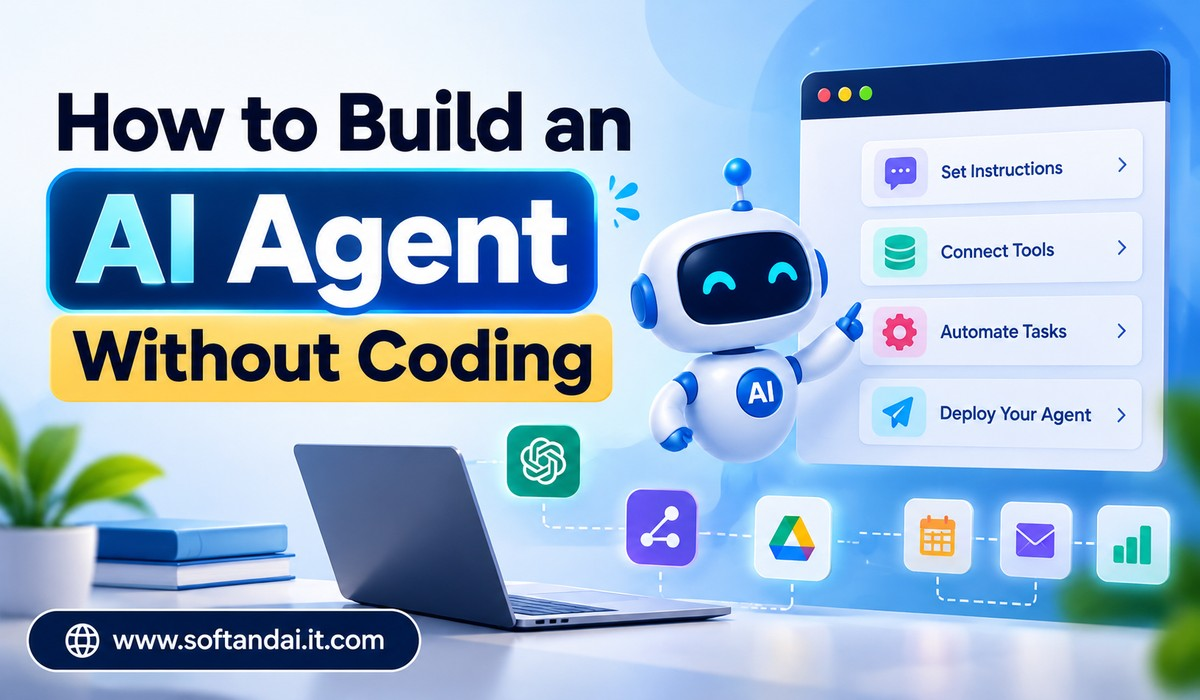
Step 1: Decide What Your AI Agent Should Do
Before opening an AI agent builder, think about the problem you want to solve. This is one of the most important parts of the entire process.
Many beginners make the mistake of trying to create an agent that can do everything. They give it too many responsibilities and expect it to handle every possible situation. This often creates confusion and produces unreliable results.
Instead, start with one clear purpose.
For example, you could create an AI agent that answers questions about your website, helps customers understand your products, prepares social media captions, or organizes incoming emails.
Suppose you run a digital marketing business. You may receive regular questions about SEO services, website development, pricing, and project timelines. You can create an AI agent that understands these services and answers common questions using information you provide.
A clear purpose makes the agent easier to build, test, and improve.
Step 2: Write Clear Instructions for Your Agent
Once you know what your agent should do, prepare its instructions. These instructions explain its role, responsibilities, communication style, and limitations.
Think of this step as explaining a job to a new employee. If you give clear directions, the person has a better understanding of what is expected.
For example, if you are creating a customer support agent, you could instruct it to answer questions politely, use simple language, explain company services, and avoid making promises that are not supported by official information.
You should also explain what the agent must do when it does not know an answer. Instead of guessing, it should tell the customer that the information is unavailable and suggest contacting a human representative.
Your instructions should be direct and easy to understand. Avoid giving conflicting directions because they can make the agent behave unpredictably.
It is also helpful to explain the type of users the agent will serve. An assistant designed for beginners should communicate differently from one created for experienced business professionals.
Step 3: Give Your AI Agent Useful Information
An AI agent needs reliable information to provide useful answers about your business, website, products, or services.
For example, if you are creating an agent for an online store, you should provide details about your products, delivery policies, return conditions, payment methods, and customer support process.
You can usually add this information through documents, text instructions, website content, or other supported sources. The available options depend on the platform you select.
Make sure the information is correct and updated. If your return policy changes, you should update the information available to your agent.
Providing accurate information can reduce incorrect answers and help the agent respond more confidently. However, even a well-prepared AI agent can misunderstand questions or produce inaccurate responses. That is why regular testing remains necessary.
Avoid uploading private customer records or sensitive business information unless you have checked the platform’s privacy and security arrangements.
Step 4: Connect the Tools Your Agent Needs
An AI agent becomes more useful when it can work with other services. Depending on the platform, you may be able to connect email accounts, calendars, spreadsheets, website forms, customer management systems, and other applications.
For example, imagine that you want an AI agent to help manage appointment requests. It could receive a customer’s preferred date, check available appointment information through an approved calendar connection, and prepare a booking request.
Similarly, a marketing assistant could collect information from a form and save it in a spreadsheet.
You do not need to connect every available service. Only add the tools that are necessary for the agent’s main purpose.
You should also decide which actions the agent can perform independently and which actions require your approval. Sending an email, changing customer information, deleting records, or making payments should not happen without suitable controls.
Start with simple connections and test each one before adding more features.
Step 5: Test Your AI Agent with Real Questions
After setting up your instructions, information, and connections, it is time to test your AI agent.
Do not assume that the agent will work perfectly just because it gives a few good answers. You should test it with different types of questions, including simple requests, unclear messages, unusual situations, and questions that it cannot answer.
For example, if you have created a website support agent, ask it about your services, pricing, contact details, and common problems. Then ask questions that are outside its responsibilities.
Check whether it understands the questions and follows your instructions. Pay attention to answers that contain incorrect details, confusing language, or information that you never provided.
If the agent gives an incorrect answer, review its instructions and information. Sometimes the problem is caused by unclear directions. In other cases, the agent may need better information or a more suitable workflow.
Testing should continue even after the agent is launched. As your business grows, customer questions and daily requirements may change.
Step 6: Make Your AI Agent Available to Users
Once you are satisfied with its performance, you can make your AI agent available to the people who need it.
Some platforms allow you to add an AI assistant to your website through an available installation option. Others provide a shareable link or a connection to messaging services.
For example, a business could place a customer support assistant on its website. Visitors could ask questions about products and services without waiting for a staff member to become available.
If your agent is designed for personal use, you may not need to publish it publicly. You can simply keep it within your chosen platform and use it whenever required.
Before making an agent publicly available, check that it does not expose private information or perform actions without proper permission. Make it clear to users that they are communicating with an AI assistant rather than a human employee.
Practical Examples of AI Agents You Can Build Without Coding
There are many ways to use no-code AI agents in everyday activities.
A website support agent is one of the easiest examples. It can answer common visitor questions, explain website services, and guide users towards the correct pages. This can save time for website owners who receive similar questions regularly.
A content writing assistant can help bloggers and marketing teams prepare article ideas, social media captions, email drafts, and content outlines. It can follow a particular writing style and use instructions provided by the website owner. However, human editing is still important before publishing content.
A research assistant can help collect information from approved sources, organize findings, and prepare short summaries. It can be useful for students, business owners, and professionals who regularly work with large amounts of information.
A sales support agent can answer basic product questions, explain service features, and collect customer requirements. It can also help prepare information for the sales team.
A personal productivity assistant can help organize tasks, prepare reminders, and manage routine information through supported connections. It can make everyday work easier when properly configured.
These examples show that you do not need to build a complicated system to benefit from AI agents. Even a small assistant that handles one repetitive activity can be valuable.
Common Mistakes to Avoid When Building an AI Agent
One common mistake is giving the agent too many responsibilities. When an assistant is expected to handle unrelated activities, it may become difficult to manage and test. Keeping its purpose clear is a better approach.
Another mistake is providing incomplete or outdated information. An AI agent cannot reliably answer business-specific questions if the details it receives are incorrect. Review its information regularly and remove anything that is no longer relevant.
Some beginners also expect an AI agent to work perfectly without supervision. This is not realistic. AI tools can misunderstand instructions, provide incorrect answers, or fail to complete an action. Important tasks should have human review.
Choosing a platform without checking its pricing is another problem. Some services offer free access with limited usage, while advanced features may require payment. Understand the costs before building an agent that becomes important to your daily operations.
Finally, avoid giving an agent unnecessary access to your accounts and business information. Only provide the permissions it needs to perform its assigned work.
How Much Does It Cost to Build an AI Agent Without Coding?
The cost depends on the platform, the features you use, and how often your agent works.
Some no-code AI platforms provide free plans that allow beginners to explore their tools and build simple assistants. These plans are useful for learning and testing ideas.
Paid plans may provide higher usage limits, additional connections, advanced features, and better support. If your agent handles many customer conversations or performs regular business activities, you may need a paid subscription.
You should also consider the cost of the AI service connected to your agent. Some services charge according to the number of requests or the amount of information processed.
For a beginner, starting with a free plan is usually a sensible choice. Once you understand how the agent works and see real benefits, you can decide whether upgrading is worthwhile.
The Future of No-Code AI Agents
No-code AI agent development is making artificial intelligence more accessible to ordinary users. People no longer need to depend entirely on programmers to create useful digital assistants for simple tasks.
As these platforms improve, building agents may become easier, with better connections between applications and more ways to manage everyday work. Small businesses could use AI assistants to support customers, manage information, and reduce repetitive activities without creating expensive custom software.
However, the quality of an AI agent will still depend on the instructions, information, and controls provided by its creator. Technology can make the process easier, but choosing the right problem and checking the results will remain important.
People who learn how to use these tools effectively may find new ways to improve their work and save time.
Conclusion
Building an AI agent without coding is now possible for beginners, students, professionals, and business owners. With no-code platforms such as Zapier, Make, Botpress, Voiceflow, and Relevance AI, you can create useful assistants without learning programming languages.
The best way to begin is to choose one simple task, select a suitable platform, write clear instructions, and provide accurate information. You can then connect the necessary services, test the agent, and make improvements before using it regularly.
Remember that an AI agent does not need to be complicated to be useful. A small assistant that answers common questions, organizes information, or helps with repetitive work can already make a difference.
Start with a simple idea, understand how the platform works, and improve your agent as your needs grow. With patience and proper planning, you can build a useful AI assistant without writing a single line of code.